As technology has advanced, character creation has become far more accessible for beginners. You no longer need years of artistic training to bring a 3D character to life for video games, animation, or cinema. Today we will look at four of the best free character creation tools for Blender users, along with their features and honest reviews so you can pick the one that suits you best.
Character design is all about creating something that feels natural, eye-catching, and distinctive to the viewer. Great character designs not only help a character look more real and lively but also leave a lasting impression on your audience. The tools below let you create realistic, animation-ready 3D characters without needing to be an expert modeler.
Here is the list of the 4 best character creators for Blender:
- Make Human (free open-source software)
- Cookie Flex Rig (Blender only)
- MB Lab (character modeling addon for Blender)
- Adobe Fuse (discontinued by Adobe)
1. Make Human Free Open Source Character Creator
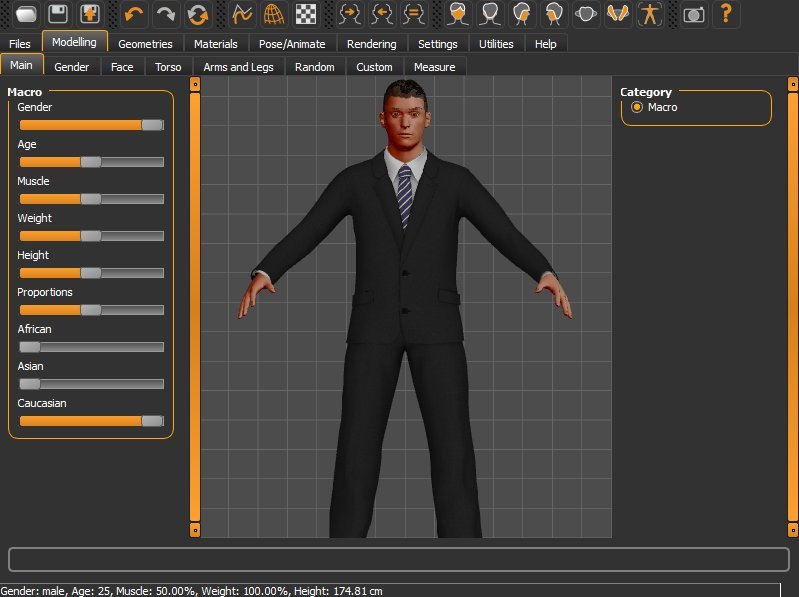
Make Human is an open-source program that can be used by anyone, from beginners to experts. You do not need to be an artist to use it. It is smaller than DAZ Studio and does not require a powerful machine. Because of its FBX support it works with Maya, 3ds Max, and Blender. Make Human also has a Blender script that makes it even easier to import models directly into Blender, speeding up the modeling process significantly.
After making a name in the animation, video game, and film industries, the Make Human team released version 1.2 after nearly four years of development. This update introduced a new Make Skin tool for advanced materials, revamped Make Clothes and Make Target tools, and a new mass-production system for randomized characters. Blender users can now use the new Makehuman Blender plugin to transfer characters between the two apps without saving external files. The codebase has also been updated to use the latest versions of Python and Qt, and you can download third-party components from the Makehuman community directly inside the software.
Make Human is completely free to download and use.
2. Cookie Flex Rig Best for Learning Blender Character Animation
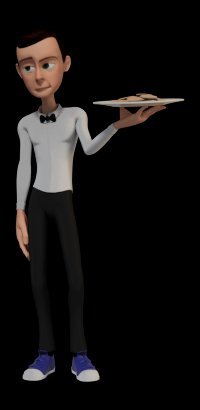
Cookie Flex Rig is one of the most versatile rigs and character generators for learning animation in Blender. It was created by CGcookie as part of their training toolkit, with the goal of providing a great resource for learning and testing character animation. Created by Nathan Vegdahl, Beorn Leonard, and Jonathan Williamson, the rig is licensed under Creative Commons Attribution 3.0, meaning you can use it for any purpose including commercial work.
No additional software or add-on installation is required. One limitation is that it relies on a script to function, which makes converting it to FBX a challenge. However, it works excellently inside Blender and supports lip-sync, making it ideal for cartoon characters. After running the script, you get a complexity menu with options to control the character's appearance and movement including height, color, clothing, features, and gender. This rig is built for maximum flexibility, with a variety of options for controlling body shape and a limited library of clothing and hairstyles.
Cookie Flex Rig is free for all uses including commercial projects.
3. MB Lab Character Modeling Addon for Blender
MB Lab is named after its developer Manuel Bastioni and was initially a research project for creating digital humans. It is a powerful character creation package for Blender 2.80 and above, tested daily with new builds and hosted on GitHub for community contributions.
MB Lab features highly realistic pre-made characters and three core traits tune, age, and bulk that drive high-quality character output. It includes professional topology with full mesh teeth, eyelashes, gums, and eyes. Characters are easily adaptable to external software with a common skeleton and well-tested rigging. The addon supports both EEVEE and Cycles, includes advanced shaders for procedural texturing, and has a large library of morphing parameters controlled through sliders. Facial rigs can be finalized and then adjusted for animation using those same sliders to keyframe expressions.
MB Lab is a free and open-source Blender addon.
4. Adobe Fuse Discontinued but Worth Knowing
Adobe Fuse was a 3D character creator that was part of Adobe's Creative Cloud, originally developed by Mixamo. It allowed users to create 3D characters and import user-generated content directly. Unfortunately Adobe Fuse has been discontinued and is no longer available for download. It is also incompatible with newer Mac OS versions.
However, Adobe has kept Mixamo alive as a character rigging and animation web service. If you already have Adobe Fuse installed, you can still use it by exporting characters in OBJ format, combining the OBJ, MTL, and textures into a ZIP file, and uploading that directly to Mixamo. Adobe Fuse connected over 280 features including hair, eyewear, and clothing fabric, all customizable in color, texture, and shape. Even after being discontinued, it remains a reference point for what a well-designed character creator can offer.
Recommendations for Beginners
If you want to put your creative ideas into the digital world, the character creators above are all free and beginner-friendly. Make Human is the best starting point if you want full control and realistic results. Cookie Flex Rig is ideal if you are focused on learning character animation inside Blender. MB Lab is the strongest choice for photorealistic Blender characters. Adobe Fuse, while discontinued, is still usable if you have it installed.
Creating 3D characters is a challenging task that demands a range of skills, but with these tools the barrier to entry is much lower. Best of luck building your characters!