Photorealism is the default goal in 3D, but it is not always the look you want. A title card, a concept piece, a stylized short or a piece of social content often works better when the render looks hand-made, like a watercolor, an oil painting or a pencil sketch. Getting that look inside Blender normally means building a non-photorealistic shader setup material by material, or rendering a clean image and taking it into a separate painting app, where it stops being connected to your 3D scene.
Artistic Filter, by 3DVision, takes a different route. It is a compositing preset: the whole effect happens in Blender's compositor, on top of your render, so you keep a live connection to the scene underneath.
Artistic Filter is available on Superhive.
What Artistic Filter Does
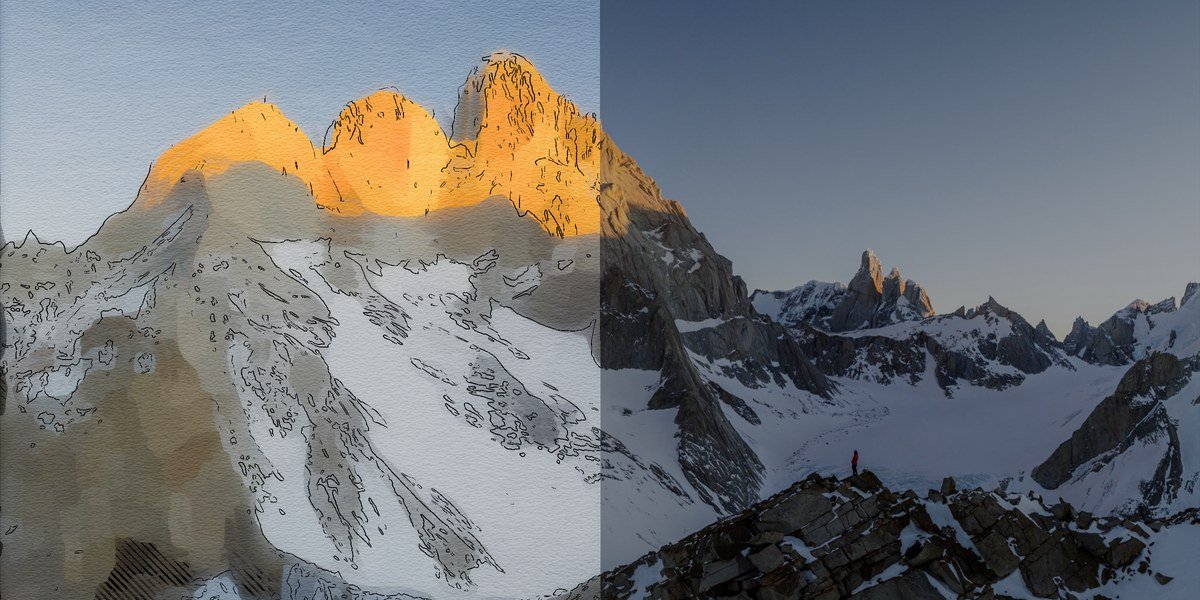
The creator describes it as a way to instantly turn 3D renders into traditional-looking art, with watercolor, stylized and sketch results, all happening in the compositor. The gallery on the listing shows watercolor and oil painting styles, with a slider that compares the original render against the filtered result, so you can see exactly what the filter changes.
The Four Controls
The listing highlights four features. Together they cover most of what makes a painted look read as painted:
- Paint Filter. A customizable procedural paint filter that gives the image an organic, textured feel instead of clean digital surfaces.
- Spherical Mask. A procedural mask with irregular edges that focuses the effect on your subject, so the painted area fades out organically around it, like a watercolor that bleeds into bare paper.
- Outline Control. Control over the color and thickness of outlines, for a sharp, hand-drawn line look.
- Scribbles. Procedural scribbles that add a sketchbook feel.
The gallery images show how they combine: soft washes of color, dark inked contours and a vignette-style fade that leaves the edges of the picture almost white.
A Non-Destructive Workflow
This is the practical advantage. Because everything runs in the compositor, the listing says that when you change your 3D scene, the filter updates in real time. Move the camera, change a light or swap a material and the painted result follows, without you re-exporting anything or repainting a flat image. That is the difference between a filter you can iterate with and a one-off effect you have to redo every time you change your mind.
See It in Action
The creator's video, titled "Artistic Filter 1.0 | How to use?", explains the setup for Blender 5.0. Since the documentation tab on the listing is empty, this video is the best way to see how it is applied.
Video by 3D Vision, the creator of Artistic Filter. Not made by BeingAnimator.
If you are planning a render pass with a heavy scene, you can estimate the cost first with our free Blender Render Time and Cost Calculator.
Where It Could Fit
The listing does not prescribe specific uses, so these are our suggestions based on what the effect does:
- Title cards and posters. A painted still can carry a project's identity better than a clean render.
- Concept and mood pieces. Quickly show a stylized direction for a scene before committing to a full pipeline.
- Stylized shorts and motion graphics. Test whether a painterly treatment suits a scene. The listing does not say how it behaves across an animation, so try a short sequence before relying on it for a whole project.
- Portfolio and social content. A distinct look that stands out in a feed full of photoreal renders.
Limits and Things to Check
- Blender version. The listing shows Blender 5.0, and the video is for Blender 5.0, so this is aimed at 5.0. Do not assume it works on older versions.
- Sparse documentation. The docs tab is empty, so you will learn it from the video and by experimenting.
- Results vary. As with any painterly filter, the look depends on your scene, lighting and settings, so test it on your own render before committing to a style.
Price and Compatibility
Artistic Filter costs $19 on Superhive at the time of writing. It is listed for Blender 5.0, works with Cycles and Eevee, and is released under the GPL license. It was published about seven months ago. Prices change with sales, so check the product page for the current figure.
Who This Is For
- Artists who want a painted, watercolor or sketch look without leaving Blender.
- Motion designers and illustrators building stylized stills from 3D scenes.
- Anyone using Blender 5.0 who likes the compositor and wants a ready-made look to start from.
Who Should Think Twice
If you are on an older Blender version, wait or ask the creator about compatibility first. If you need detailed written documentation, the empty docs tab may frustrate you. And if you want a fully custom non-photorealistic look built from scratch, you may prefer to build your own compositor setup.
If you have ever wished a render looked like it was painted by hand, this is a low-cost way to try that look inside Blender, with a live connection to your scene. Watch the video, check that you are on Blender 5.0, and test it on one of your own renders.
Artistic Filter is available on Superhive.