Auto-Rig Pro makes rigging a human character straightforward. Rig a dog, a bird, a spider, or a dragon, and you are on your own. Quadrupeds need a completely different leg chain than a biped. Insects need extra limbs and a different spine logic. Most Blender artists who can rig a person competently have never rigged a four-legged animal, and building one correctly from scratch, with working IK, clean bone roll, and sane proportions, is a different skill entirely.
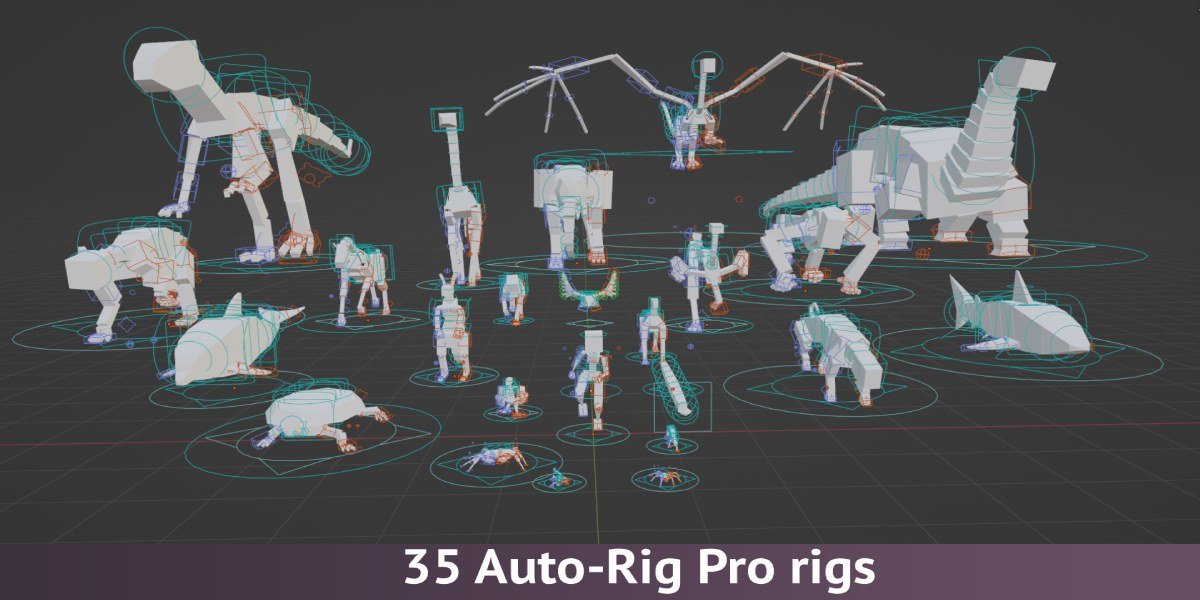
Auto-Rig Pro: Rig Library, by Joris, is a collection of 35 ready-made rigs built specifically for non-human characters, each one designed to plug directly into Auto-Rig Pro.
35 Rigs, Not Just Humans
The library covers mammals (bear, cat, dog, horse, elephant, tiger, gorilla), birds (chicken, duck, ostrich), reptiles and amphibians (frog, lizard, snake, turtle), insects and arachnids (ant, bee, butterfly, spider), sea creatures (dolphin, fish, shark), and a few things that are not real animals at all (dragon, allosaur, apatosaurus). A human rig is included too, but the real value here is everything Auto-Rig Pro does not cover on its own.
A Block Mesh Does the Fitting for You
Each rig ships with a block mesh, a rough placeholder shape used as a visual reference for scaling the rig and placing bones correctly inside your own model. Instead of guessing where a spider's leg joints should sit relative to its body, you scale the block mesh to match your character and the bone placement follows from that.
The workflow is the same five steps regardless of which creature you pick: select a rig, scale it, adjust the bone count if needed, place the bones inside your model, and bind. That consistency matters when you are jumping between very different anatomies in the same project.
Comes With a Locomotion Animation Already Baked In
Every rig includes at least one locomotion animation appropriate to that creature: a walk for a horse, a swim for a shark, a fly for a bee. You are not starting animation from a T-pose with zero reference for how that specific anatomy should move. For a quick previz, a background creature, or a prototype, that single animation is often enough on its own.
Built With Game Engines in Mind
The rigs are set up for export to Unity and Unreal, and the included animations are keyed at 30fps to match typical game engine expectations. If the end destination is a game rather than a film render, that decision is already made for you instead of something you have to configure yourself after the fact.
Who This Is For
- Game developers who need a menagerie of creatures rigged and animated without hiring a dedicated character rigger for each one.
- Animators who already use Auto-Rig Pro for human characters and occasionally need a non-human character in the same project.
- Anyone prototyping a scene with animals or creatures who needs something that moves correctly now, not a perfect custom rig later.
If the next character in your scene does not walk on two legs, this closes the gap Auto-Rig Pro leaves open on its own.
Auto-Rig Pro: Rig Library is available on Superhive.