Dropping a video into a Blender scene is easy. Making it feel like it belongs there is not. A flat video plane looks flat the moment the camera moves, and the usual fix, building matching 3D geometry by hand, is slow work for something that may only be on screen for a few seconds. Faking depth from footage is a classic problem for VFX and motion artists.
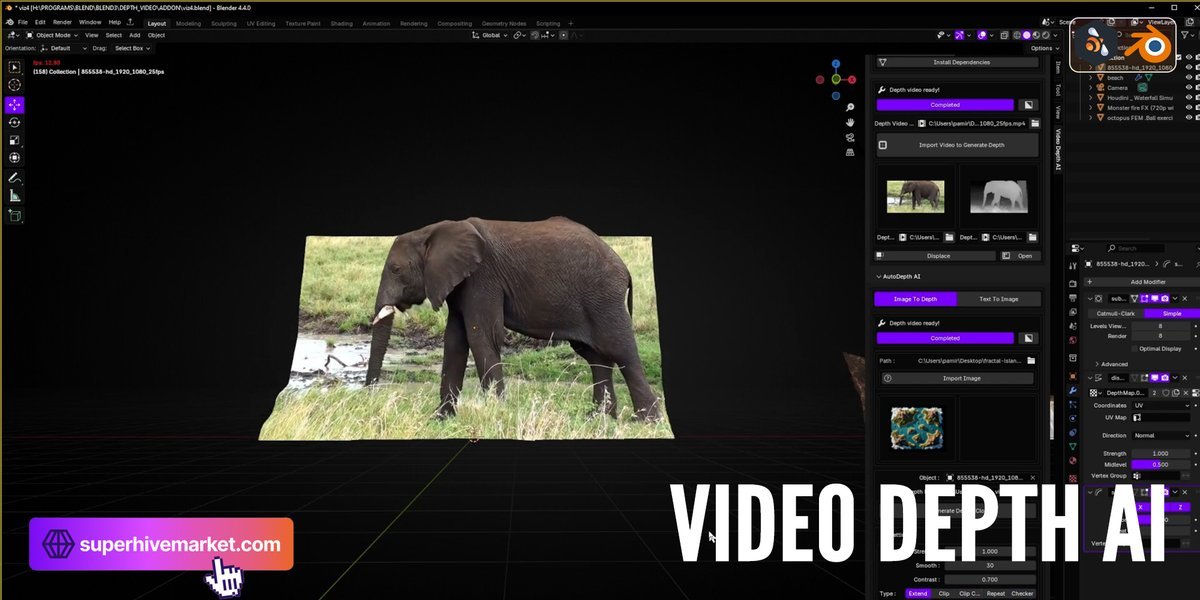
Video Depth AI, by Blender Procedural, attacks it directly. It runs an AI depth estimation model on your video and uses the result to displace geometry frame by frame, so the footage becomes an animated 3D surface inside Blender.
From Video to Displaced 3D in Four Steps
The workflow is short. Install the addon and check its dependencies from the panel, import your video with "Import Video to Generate Depth", let the depth maps generate (they start automatically), then click Displace. The flat clip turns into a 3D animated model driven by the depth of each frame.
Cloud or Local Processing
The addon is designed to work in two ways. The cloud option needs no setup, and a local mode is available if you have an NVIDIA GPU and would rather keep processing on your own machine. As mentioned above, the creator notes the cloud option is having problems at the moment, so local mode is the reliable route for now if your hardware supports it.
Where It Fits
The creator points to terrain and environment generation, depth-based art and experiments, and animation and VFX workflows. That matches what it does best: turning reference footage into a quick 3D backdrop, building parallax scenes, or experimenting with looks that would take far longer to model. A bonus text-to-image generator is included as well.
Who This Is For
- Motion designers and VFX artists who want depth and parallax from existing footage without modeling it.
- Artists experimenting with depth-based looks and stylized 3D versions of real clips.
- Anyone with an NVIDIA GPU who wants an AI depth workflow living inside Blender instead of a separate tool.
If you have footage that needs to live in a 3D scene and you would rather generate the depth than build it, this is a fast way to test the idea.
Video Depth AI is available on Superhive.