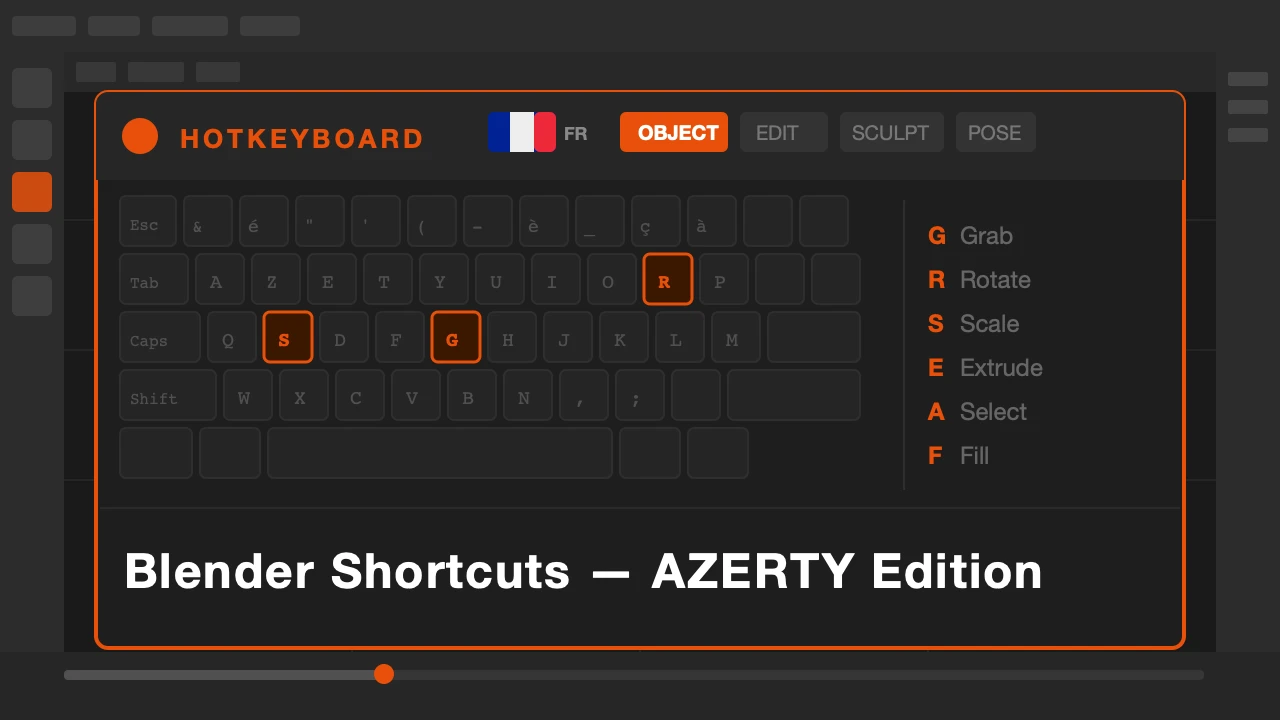
Every Blender tutorial, every shortcut guide, every cheat sheet is written for QWERTY. If you use an AZERTY keyboard, you already know the problem. The key positions are different. The references are wrong for your setup. You have to translate every shortcut in your head before you can use it.
That translation is a constant friction. It slows learning and breaks flow. HotkeyBoard AZERTY removes it.
HotkeyBoard AZERTY is available on Superhive.
The AZERTY Problem in Blender
Blender was designed with QWERTY in mind. Most of its shortcuts are documented for QWERTY. When you use an AZERTY keyboard, some shortcuts work the same, some are in different positions, and some require workarounds that are never written down anywhere.
French-speaking Blender users often end up with a patched understanding of their own keymap. They know the shortcuts but not always why a particular key does what it does on their layout.
What HotkeyBoard AZERTY Does
It is HotkeyBoard, rebuilt and remapped for AZERTY keyboards. All the same shortcuts, all the same modes, all the same live updating as you press keys. But every key position reflects what is actually on your keyboard.
Press a key and see its shortcut in the context of your actual layout. Switch modes and the display updates. Hold a modifier and see the combinations available. Everything that HotkeyBoard does for QWERTY users, this does for AZERTY users.
759 shortcuts across 8 Blender modes. All of them mapped correctly. No QWERTY translation required.
Who This Is For
French-speaking Blender artists using AZERTY keyboards. Belgian and Swiss users on AZERTY layouts. Anyone who has been learning Blender with a French keyboard and constantly running into shortcut documentation that does not match their setup.
Stop translating. Your keyboard is the reference now.
Blender shortcuts, mapped to your actual keyboard.